Scripting
The MOAS Client can receive messages from a scripting program. This can be used for various tasks including defining “hot keys” which will select an antenna or turn a rotator. It can also be used to activate the logging program’s entry window (and it will select the active station if SO2R).
Message Format
Section titled “Message Format”All messages are sent using PostMessage or SendMessage and a scripting program must have this capability. PostMessage takes a message number and two numeric arguments. They are directed to a MOAS Client window. SendMessage takes the same arguments but returns a number. It is used for queries.
The Antenna Display, Antenna Selector, and Rotator Direction windows accept messages for scripting. Numbers in messages are zero-based. For example the first antenna in a list is antenna 0 and the top left button is row 0 column 0.
Antenna Display
Section titled “Antenna Display”The Antenna Display window accepts five messages.
Message 32768 has no effect on any antennas or rotators. The arguments must be zero. The logging program’s entry window will become active.
Get Display Information
Section titled “Get Display Information”Message 32769 returns information about the antenna display window. The first argument describes the information to be returned. The second argument is the section.
These are the possible values for the first argument:
| Number | Purpose |
|---|---|
| 0 | Return the number of sections. The second argument must be zero. |
| 1 | Return the station number for the specified section. |
| 2 | Return the radio number for the specified section. |
| 3 | Return the lower frequency for the specified section. |
| 4 | Return the upper frequency for the specified section. |
| 5 | Return the number of antennas displayed in the specified section. |
| 6 | Return the number of antennas in the specified section. |
If an invalid operation or non-existent section is specified the returned value will be 0xFFFFFFFF.
Get Antenna ID
Section titled “Get Antenna ID”Message 32770 returns the ID of a specific antenna. The first argument is the section. The second argument is the antenna within the section.
If a non-existent section is specified the returned value will be 0xFFFFFFFF. If the antenna does not exist the returned value will be 0xFFFFFFFE.
Select Antenna
Section titled “Select Antenna”Message 32771 changes the selected antenna for a radio. The first argument is the section of the window (antenna display can show several sections). The second is the antenna within the section. Both of these start with zero (the first section is zero and the first antenna is zero).
The antenna display will not show all antennas if there are more antennas in a section than the section was configured for. And the display may be set to centre the selected antenna. These are not used to determine which antenna is selected — the number for an antenna within the section will stay the same for an antenna regardless of which is displayed in the window.
This message will select an antenna even if the Antenna Display window will not allow selection by using a mouse.
Activate Function
Section titled “Activate Function”Message 32772 activates a function, such as swapping antennas or saving the current selection. The first argument is the section of the antenna display window corresponding to the function. Normally this can be zero. The second argument is the ID of the function in the server configuration file.
Antenna Selector
Section titled “Antenna Selector”The Antenna Selector window accepts two messages.
No-Op (Selector)
Section titled “No-Op (Selector)”Message 32768 has no effect on any antennas or rotators. The arguments must be zero. The logging program’s entry window will become active.
Get Selector Information
Section titled “Get Selector Information”Message 32769 returns information about the antenna selector window. The first argument describes the information to be returned. The second argument must be zero.
These are the possible values for the first argument:
| Number | Purpose |
|---|---|
| 0 | Return the number of rows and columns. The number returned is the number of rows times 100 plus the number of columns. |
| 1 | Return the station number. |
| 2 | Return the radio number. |
| 3 | Return the lower frequency. |
| 4 | Return the upper frequency. |
If an invalid operation is specified the returned value will be 0xFFFFFFFF.
Get Button Information
Section titled “Get Button Information”Message 32770 returns information about the antenna selector button. The first argument describes the information to be returned. The second argument specifies the button as the row times 100 plus the column.
These are the possible values for the first argument:
| Number | Purpose |
|---|---|
| 0 | Return the type of the button, zero if it is an antenna and one if it is a function. |
| 1 | Return one if this is an additive antenna such as a Yagi in a stack, zero otherwise. |
| 2 | Return the transmit and receive state. Zero is unavailable, one is available, and two is selected. The returned value is the transmit state times ten plus the receive state. |
| 3 | Return antenna or function ID. |
If an invalid operation is specified or the number of rows or columns is more than the selector contains, the returned value will be 0xFFFFFFFF. If a button does not have an antenna or function the returned value will be 0xFFFFFFFE.
Select Antennas or Function
Section titled “Select Antennas or Function”Message 32771 selects transmit and receive antennas or selects a function. The first argument is the transmit antenna or function and the second is the receive antenna.
The antenna or function is determined by the row and column where it appears in the Antenna Selector Window. The number is the row times 100 plus the column plus a modifier as follows:
| Number | Purpose |
|---|---|
| 0 | Select this as the only antenna. |
| 10000 | If this antenna is part of an additive system (such as an antenna stack) select it in addition to the others already selected. If a different antenna system is selected or this is not part of an additive system then select it as the only antenna. |
| 20000 | If this antenna is part of an additive system (such as an antenna stack) deselect it if it is selected and if deselecting it would not result in no antennas being selected. Otherwise select it as the only antenna. |
| 30000 | If this antenna is part of an additive system (such as an antenna stack) select it if it is deselected and deselect it if it is selected (toggle the selection). |
| 40000 | Do nothing with this antenna (no-op). This is used for the receive antenna if selecting only a transmit antenna or vice-versa. |
Rotator Direction
Section titled “Rotator Direction”The Rotator Direction window accepts two messages.
No-Op (Rotator)
Section titled “No-Op (Rotator)”Message 32768 has no effect on any antennas or rotators. The arguments must be zero. The logging program’s entry window will become active.
Get Rotator Information
Section titled “Get Rotator Information”Message 32769 returns information about the antenna rotator. The first argument describes the information to be returned. The second argument depends on the first.
These are the possible values for the first argument:
| Number | Purpose |
|---|---|
| 0 | Returns the number of rotators displayed by the window. The second argument must be zero. |
| 1 | Returns the direction of the specified rotator. The argument is the rotator. Zero is the first rotator. |
If an invalid operation or rotator greater than the maximum is specified the returned value will be 0xFFFFFFFF. If an unused rotator is specified the returned value may be 0xFFFFFFFE.
Direction
Section titled “Direction”Message 32770 sets the direction of one or more rotators. The first argument is the heading. The second argument must be zero.
Examples
Section titled “Examples”There are many scripting programs available. These examples use AutoHotkey which is a free scripting language that provides hot key capabilities.
These examples are provided to show how to script the MOAS Client and not as complete examples of AutoHotkey scripts. AutoHotkey has many powerful features and can assign a script to almost any key.
Small Station Example
Section titled “Small Station Example”The small station configuration is supplied as an example MOAS configuration. It has an all-band vertical, a triband beam, and dipoles for 40 and 80. There are at most three antennas available on any band. An antenna display with two sections and three antennas in each section will show all choices. The antenna display is named “Antennas”.
The station has one rotator which is in a window named “Rotator”.
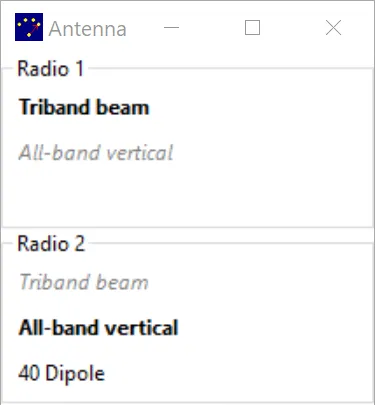
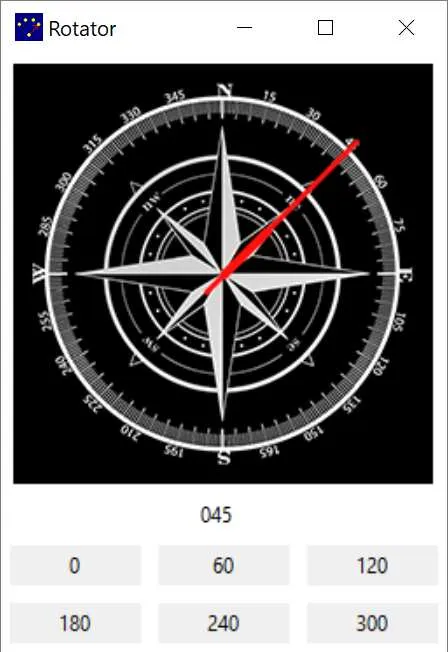
Scripting will be used to select antennas and rotate the triband beam using the keyboard. The script shows the use of the commands to select an antenna and activate a function in a display window and to set a rotator direction.
The logging program does not use the WIN key for any commands. So WIN-F1 through WIN-F12 would be available for antenna and direction control. The assignments will be as follows:
| Key | Purpose |
|---|---|
| WIN-F1 | Select first antenna in display for Radio 1 |
| WIN-F2 | Select second antenna in display for Radio 1 |
| WIN-F3 | Select third antenna in display for Radio 1 |
| WIN-F4 | Swap the Radio 1 and Radio 2 antennas |
| WIN-F5 | Select first antenna in display for Radio 2 |
| WIN-F6 | Select second antenna in display for Radio 2 |
| WIN-F7 | Select third antenna in display for Radio 2 |
| WIN-F8 | Swap the Radio 1 and Radio 2 antennas |
| WIN-F9 | Turn tribander to 45 degrees |
| WIN-F10 | Turn tribander to 180 degrees |
| WIN-F11 | Turn tribander to 270 degrees |
| WIN-F12 | Turn tribander to 330 degrees |
This is an example script which would implement the above keys using AutoHotkey:
#NoEnv#Warn#SingleInstance ForceSendMode InputSetWorkingDir %A_ScriptDir%
#F1::    PostMessage, 32771, 0, 0, , Antennas    Return
#F2::    PostMessage, 32771, 0, 1, , Antennas    Return
#F3::    PostMessage, 32771, 0, 2, , Antennas    Return
#F4::    PostMessage, 32772, 0, 0, , Antennas    Return
#F5::    PostMessage, 32771, 1, 0, , Antennas    Return
#F6::    PostMessage, 32771, 1, 1, , Antennas    Return
#F7::    PostMessage, 32771, 1, 2, , Antennas    Return
#F8::    PostMessage, 32772, 0, 0, , Antennas    Return
#F9::    PostMessage, 32769, 45, 0, , Rotator    Return
#F10::    PostMessage, 32769, 180, 0, , Rotator    Return
#F11::    PostMessage, 32769, 270, 0, , Rotator    Return
#F12::    PostMessage, 32769, 330, 0, , Rotator    Return
Big Station Example
Section titled “Big Station Example”The big station configuration is supplied as an example MOAS configuration. It has vertical four-squares on 160–40 and multiple beams including stacks on 20–10. Two antenna selectors are named “Selector 1” and “Selector 2”.
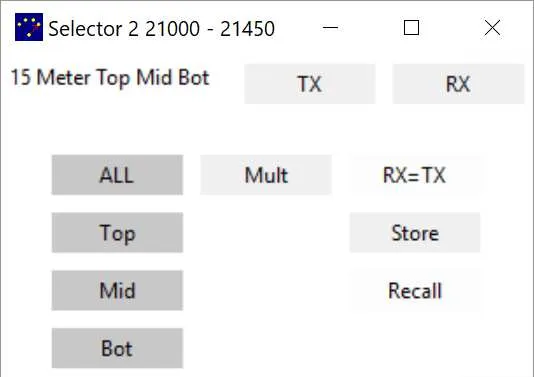
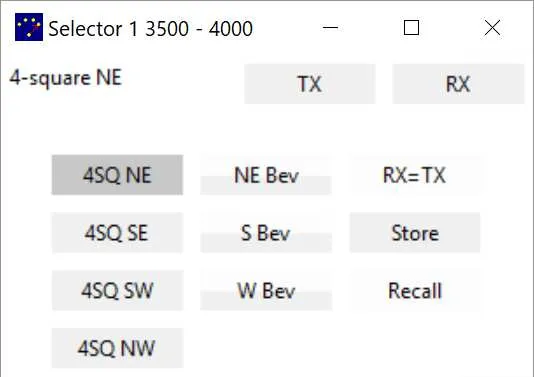
This script is more complex than the simple station script. The behaviour of the keys depends on the band and which antenna is selected. Pressing a key multiple times can switch between antennas or can activate or deactivate a receiving antenna.
| Key | Purpose |
|---|---|
| WIN-F1 | Select an antenna for Radio 1. For 80 and 160 select the NE 4-square. Toggle the NE beverage on and off if pressed again. For 40 select the beam. Switch between the beam and NE 4-square if pressed again. For 20–10 select the entire stack. Toggle between receiving on the full stack and only the bottom antenna (useful during rain static) if pressed again. |
WIN-F2 through WIN-F4 would select the other 4-square directions and toggle the appropriate receive antennas and would select different stack combinations and the multiplier antenna. This is the part of the script for WIN-F1:
#NoEnv#Warn#SingleInstance ForceSendMode InputSetWorkingDir %A_ScriptDir%
; Commands for Antenna Selector windowglobal GET_SELECTOR_INFO := 32769global GET_BUTTON_INFO := 32770global SELECT_ANT := 32771
; GET_SELECTOR_INFO operationsglobal GET_SELECTOR_LOWER_FREQ := 3
; GET_BUTTON_INFO operationsglobal GET_BUTTON_STATE := 2
; Button stateglobal BUTTON_SELECTED_TX_RX := 22
; Selection modifiersglobal SELECTION_NOOP := 40000
; Buttons by row and columnR0C0 := 0R0C1 := 1R1C0 := 100R1C1 := 101R2C0 := 200R2C1 := 201R3C0 := 300R3C1 := 301
; The antennas on the Selectorglobal ANT_4SQ_NE  := R0C0global ANT_4SQ_SE  := R1C0global ANT_4SQ_SW  := R2C0global ANT_4SQ_NW  := R3C0
global ANT_BEV_NE  := R0C1global ANT_BEV_S   := R1C1global ANT_BEV_W   := R2C1
global ANT_40_BEAM := R0C1
global ANT_ALL     := R0C0global ANT_TOP     := R1C0global ANT_MID     := R2C0global ANT_BOT     := R3C0
global ANT_MULT    := R0C1
; The names of the selector windows for radio 1 and radio 2RADIO_1_WINDOW := "Selector 1"RADIO_2_WINDOW := "Selector 2"
DoF1(selector){    if !WinExist(selector)        Return
    ; Get the frequency    SendMessage, GET_SELECTOR_INFO, GET_SELECTOR_LOWER_FREQ, 0    if ErrorLevel = FAIL        Return    frequency := ErrorLevel
    if (frequency = 1800) || (frequency = 3500)    {        ; See if the NE antenna is selected for transmit and receive        SendMessage, GET_BUTTON_INFO, GET_BUTTON_STATE, ANT_4SQ_NE        if ErrorLevel = FAIL            Return
        if (ErrorLevel = BUTTON_SELECTED_TX_RX)        {            ; NE is selected, turn on NE beverage            PostMessage SELECT_ANT, SELECTION_NOOP, ANT_BEV_NE            Return        }
        ; NE not selected or has beverage, select it        PostMessage SELECT_ANT, ANT_4SQ_NE, ANT_4SQ_NE        Return    }
    if frequency = 7000    {        ; See if the beam is selected        SendMessage, GET_BUTTON_INFO, GET_BUTTON_STATE, ANT_40_BEAM        if ErrorLevel = FAIL            Return
        if (ErrorLevel = BUTTON_SELECTED_TX_RX)        {            ; Beam is selected, switch to NE 4-square            PostMessage SELECT_ANT, ANT_4SQ_NE, ANT_4SQ_NE            Return        }
        ; Beam is not selected, select it        PostMessage SELECT_ANT, ANT_40_BEAM, ANT_40_BEAM        Return    }
    ; 10, 15, 20 all have a three antenna stack    SendMessage, GET_BUTTON_INFO, GET_BUTTON_STATE, ANT_ALL    if ErrorLevel = FAIL        Return
    if (ErrorLevel = BUTTON_SELECTED_TX_RX)    {        ; Whole stack is selected, receive on lower only        PostMessage SELECT_ANT, SELECTION_NOOP, ANT_BOT        Return    }
    ; Stack is not selected, select it    PostMessage SELECT_ANT, ANT_ALL, ANT_ALL    Return}
#F1::    DoF1(RADIO_1_WINDOW)    Return